
TL;DR
How I write this blog now, without WordPress.
The previous post got me here: an Astro site on Cloudflare, posts as Markdown, and a publish step that is a prompt in Cursor plus Commit in the Source Control sidebar. That is enough for brochure pages. A blog still wants drafts, a post list, images, and a publish button.
This is how that layer landed on revthat.com, and how I actually write a post now: Save draft in /admin, then finish it in Cursor Agent. This article is that loop.
What the git history actually did
The repo did not start as a CMS. First it was a static migration. Add Astro static site with migrated RevThat posts and assets put the old WordPress articles into src/content/posts/ and the images into public/images/posts/. Chrome, nav, favicons, and the sister-site links came next. Publishing was still “edit the files, Commit, Sync.”
Then one commit changed the shape of the site: Add production CMS worker so /admin can publish posts from the live site. That added a Worker at worker/, a static admin app at public/admin/, wrangler.jsonc pointing at both, and Cloudflare Workers Builds, which builds and deploys on every push to main.
The rest of that day was authoring, not architecture:
- An Edit link on live posts when the CMS session cookie is valid
- A split Markdown editor, then Toast UI Editor
- Paste and upload for
/images/posts/ - Delete, with a confirmation
- The admin list staying in sync after save, so Draft vs Live is current without a full reload
You can see who wrote which commit. Human (or agent) messages look like ordinary git. The Worker writes a small vocabulary of its own:
cms: save draft <slug>cms: publish <slug>cms: upload <filename>cms: delete <slug>
This post already has two of those save-draft commits. The WordPress migration post has a stack of them, plus cms: upload for pasted screenshots, then cms: publish.
The friction showed up immediately. Local Cursor work and the Worker both push to main. A normal git pull (a merge) produced Merge branch 'main' of https://github.com/truevis/web-revthat. Those bubbles are why /publish-cms exists.
How it is wired
The public site is still static. npm run build writes dist/. Wrangler serves that folder as Worker assets. The Worker itself only needs to run first for the CMS API:
{
  "name": "web-revthat",
  "main": "worker/index.ts",
  "compatibility_date": "2026-08-31",
  "assets": {
    "directory": "./dist",
    "binding": "ASSETS",
    "not_found_handling": "404-page",
    "html_handling": "auto-trailing-slash",
    "run_worker_first": ["/api/*"]
  },
  "vars": {
    "GITHUB_REPO": "truevis/web-revthat",
    "GITHUB_BRANCH": "main"
  }
}
/admin is not a second host. It is static HTML, CSS, and JS in public/admin/, copied into dist with the rest of the site. You log in with a password. The Worker sets an HttpOnly session cookie. After that, the editor talks to /api/cms/* on the same origin.
Save and Publish do not write a database row. They PUT a Markdown file through the GitHub Contents API. Draft vs live is a YAML flag:
draft: truegetPosts() drops anything with draft: true (and files whose names start with _). Save draft still commits, and that commit still triggers a deploy. Astro just does not generate a public URL for the post. The file is on GitHub. It is not on the journal.
The Worker labels those commits for you:
const verb = fields.draft ? "save draft" : "publish";
await putFile(env, postPath(slug), utf8ToBase64(markdown), `cms: ${verb} ${slug}`, sha);
Secrets stay in Wrangler (CMS_PASSWORD, CMS_SESSION_SECRET, GITHUB_TOKEN). They are not in the repo. A PAT with Contents write on this repository is enough. Login is rate limited. Mutating requests have to look same-origin.
Every push to main, CMS or local, runs the Workers Builds pipeline: npm ci, npm run build, then the configured Cloudflare deployment. If you are logged into /admin and you open a live post, an Edit link appears and takes you to /admin/?edit= plus the slug. Logged-out visitors never see it.
Two doors, one folder:
/admin            -->  Worker /api/cms  -->  GitHub main (Markdown)
/create_article   -->  local src/content/posts/*.md
/publish-cms      -->  rebase, push     -->  GitHub
GitHub            -->  Cloudflare Workers Builds: build, deploy  -->  revthat.com
The process I use now: draft, then Cursor Agent
I do not write a long post in the browser editor. I use /admin to create the file, then I use Cursor to write it. This page is that process.
- Open
/admin, New post. Title, slug, description, category. Save draft. The Worker commitscms: save draft operating-a-cms-on-cloudflare-powered-by-cursor. The file issrc/content/posts/operating-a-cms-on-cloudflare-powered-by-cursor.mdwithdraft: true. - Catch the local clone up with GitHub. If the working tree is clean and I am only behind CMS commits,
/publish-cmscan reset localmaintoorigin/main. If I already have local edits, it rebases onto the latestcms:commits, resolves conflicts, and pushes in one run. - In Cursor Agent,
@that Markdown file. Tell it to flesh the article out from git history, sibling posts, and the skill file. Or type/create_articleand answer the questions. That skill is the same job, written down. Review the diff in the editor.npm run devwill still hide the post from listings while it is a draft. That is intended. Read the file, not the home page. - Iterate in chat. Keep
draft: trueuntil the copy is done. - Publish from
/admin(Publish), or setdraft: falselocally and run/publish-cmsso the local commit is rebased onto whatever the Worker already wrote.
The browser editor is still useful: title, slug, paste an image, a quick unpublish. The agent is useful when the post has to explain a repo, quote a skill, and match the voice of the last article. I do not need a WordPress block editor for that. I need the file, and an agent that can see the rest of the stack.
Making the skill, then running it
The CMS Worker already commits to GitHub. My laptop also has a clone. Those two writers do not share an index. If I Commit in the sidebar and Cursor does a merge-pull, I get a merge commit that only exists to admit the histories met. The log fills with Merge branch 'main' of https://github.com/.... The files are fine. The history is not.
A Cursor skill is a SKILL.md the agent loads when I type a slash command. I put this one in the repo at .cursor/skills/publish-cms/SKILL.md so any session on this site gets the same rules. It publishes local changes. It does not rewrite CMS commit messages. It does not touch the Worker.
The rules that matter in practice:
- Finish in one run: commit (if needed), rebase, resolve conflicts, push, report. Do not stop mid-rebase and leave Source Control in a half-finished merge state.
- Never
git pullwithout--rebase. That is what made the bubbles. - Never force-push
mainunless I said so in that turn, and even then not to rewrite production history that is already shared. Default: no force push. - If local is behind and has no unique commits,
git reset --hard origin/mainis allowed. That is how you pick upcms: save draftcommits. - If local has real commits, rebase onto
origin/main. When/adminand Cursor both touched the same post, keep the local replayed commit forsrc/content/posts/*.md(git checkout --theirsduring rebase), thenGIT_EDITOR=true git rebase --continueuntil done, then push. - Stash unrelated dirty files before rebase; report stashes left behind.
- Report cleanup path, conflicts resolved, ahead/behind/even, push outcome.
Here is the skill as it sits in the repo:
---
name: publish-cms
description: >-
  Syncs local git main onto CMS GitHub commits with rebase (not merge), resolves
  conflicts, and pushes — finish in one run. Use when the user runs
  /publish_cms or /publish-cms, or mentions publish cms, sync after local edits,
  rebase onto cms commits, push without merge bubbles, clean up local merge branches.
---

# Publish CMS (local git)

This site's CMS Worker already commits to GitHub `main` via the Contents API (`cms: save draft …`, `cms: publish …`). This skill publishes **local repo** changes. Do not change CMS commit messages or Workers.

**Finish in one run.** Inspect → commit (if needed) → linearize → resolve any rebase conflicts → push → report. Do not stop mid-rebase and wait for the user unless force-push is required or a conflict cannot be resolved with the rules below.

If the working tree is clean, local `main` matches `origin/main`, and there is nothing to commit or linearize, say so and stop. Push only if local is ahead after a successful rebase.

## Never

- Update git config
- Skip hooks (`--no-verify`, `--no-gpg-sign`)
- Force-push `main` unless the user explicitly asked in **this** turn **and** the rewritten commits were never the shared production history they care about. Default: **no force push**. If cleanup would require `--force-with-lease` because merge commits are already on `origin/main`, **STOP** and explain. Do not rewrite published `main`.
- Commit `.env`, `.env.*`, `.dev.vars`, `.dev.vars.*`, secrets, `dist/`, `.wrangler/`
- Use `git rebase -i`
- Leave a rebase in progress when conflicts can be resolved per §4

## Sequence

Run from the repo root. Use parallel read-only git commands in step 1 where helpful.

### 0. Resume mid-rebase (if needed)

If `git status` shows a rebase in progress (`interactive rebase`, `HEAD (no branch)`, or `rebase in progress`):

1. Skip steps 2–3.
2. Run **§4 Conflicts** until the rebase completes.
3. Run **§5 Push** and **§6 Report**.

### 1. Inspect

```bash
git fetch origin
git status -sb
git branch -vv
git log --oneline --decorate -20
git rev-list --left-right --count origin/main...HEAD
git log --oneline --merges -10
git diff --name-only --diff-filter=U
```

* If a rebase is already in progress, go to **§0**.
* If HEAD is not `main` and no rebase is in progress, stop and say so.
* Note recent `cms: save draft <slug>` on `origin/main` while local commits or staged edits touch `src/content/posts/<slug>.md` — a rebase conflict on that file is **expected**; resolve it in §4 without stopping.

The merge log is a quick diagnostic for local merge bubbles (`Merge branch 'main' of https://github.com/...`) you are about to drop or that are already on the remote.

### 2\. Commit local work

Uncommitted edits the user clearly wants published: stage **relevant** files only, draft a concise 1–2 sentence message (why, not what), commit. Do not commit ignored/secret/build artifacts listed above.

**Unrelated dirty files** (e.g. deleted notes, local plans): `git stash push -m "publish-cms: unrelated" -- <paths>` before rebase. Do not stop to ask unless the change might be secrets or the publish scope is genuinely unclear.

If the tree is dirty with only untracked files that should stay untracked (`.cursor/plans/`, etc.), leave them and continue.

### 3\. Merge cleanup \(linearize onto CMS commits\)

**Never** `git pull` without `--rebase` — that creates merge bubbles.

After `git fetch origin`, choose one path:

1. **Unpushed merge commits on local** (ahead and/or unpushed range contains `Merge branch 'main'…`): use `git pull --rebase origin main` or `git rebase origin/main`.
2. **Behind `origin/main`, no unique local commits**: verify with `git log origin/main..HEAD --oneline` — if empty, or every commit in that range is a merge commit with no unique changes, ensure the working tree is committed or stashed, confirm `git log origin/main..HEAD --no-merges --oneline` is empty, then `git reset --hard origin/main`.
3. **Behind `origin/main` and has unique unpushed commits** (`git log origin/main..HEAD --no-merges` non-empty): commit any remaining local work first, then `git pull --rebase origin main`.
4. **Merge commits already on `origin/main`**: cannot be removed without force-push. **STOP** and explain; do not force-push by default.
5. **Even with `origin/main` after cleanup**: if you made new commits this run, push in §5; otherwise report even/clean.

If rebase stops, go immediately to **§4** — do not report and exit.

### 4\. Conflicts \(resolve and continue until done\)

Loop until rebase finishes:

```bash
git diff --name-only --diff-filter=U
```

For each unmerged path, resolve, `git add <path>`, then:

```bash
# bash / macOS / Linux
GIT_EDITOR=true git rebase --continue

# PowerShell
$env:GIT_EDITOR = 'true'; git rebase --continue
```

Repeat until `git status` shows no rebase in progress and `main` is checked out.

**Resolution rules** (during rebase, `--ours` = `origin/main` / CMS side, `--theirs` = the local commit being replayed):

| Path | Rule |
| ---- | ---- |
| `src/content/posts/*.md` | Keep **local replayed commit**: `git checkout --theirs -- <file>` then `git add`. This is the Cursor draft the user is publishing. |
| Same post, user said "keep CMS" or "keep GitHub" in **this** turn | `git checkout --ours -- <file>` then `git add`. |
| Whitespace-only or obviously identical hunks | Merge manually or take either side; prefer `--theirs` for post bodies. |
| Code/config the local commit touched (`worker/`, `public/admin/`, `package.json`, etc.) | Keep **local replayed commit** (`--theirs`) unless the hunk is clearly stale. |
| Other | Prefer `--theirs` if the local commit introduced the change; otherwise inspect the diff and pick the side that preserves local intent. |

After resolving, strip any leftover conflict markers (`<<<<<<<`, `=======`, `>>>>>>>`) before `git add`.

Abort only if the user asks (`git rebase --abort`).

### 5\. Push

After rebase/reset succeeds and status is clean (or only untracked files that should stay untracked):

```bash
git push origin main
```

No `--force` / `--force-with-lease` unless the Never section allows it.

### 6\. Report

* Merge cleanup path used (rebase, reset, resume, or none)
* What was committed (if anything)
* Conflicts resolved (files and which side: local/CMS)
* Stashes created (if any) and whether to drop or apply
* That CMS admin Save/Publish already wrote GitHub; this step was local git
* Result vs `origin/main` (ahead/behind/even)
* Push outcome
* If skipped force-push: why, and that history stays linear going forward by using rebase not merge
Running it is the slash command. Two outcomes show up often:
After Save draft in /admin, local main was behind CMS commits and the working tree was clean. /publish-cms fetched, reset to origin/main, reported even. Nothing to push.
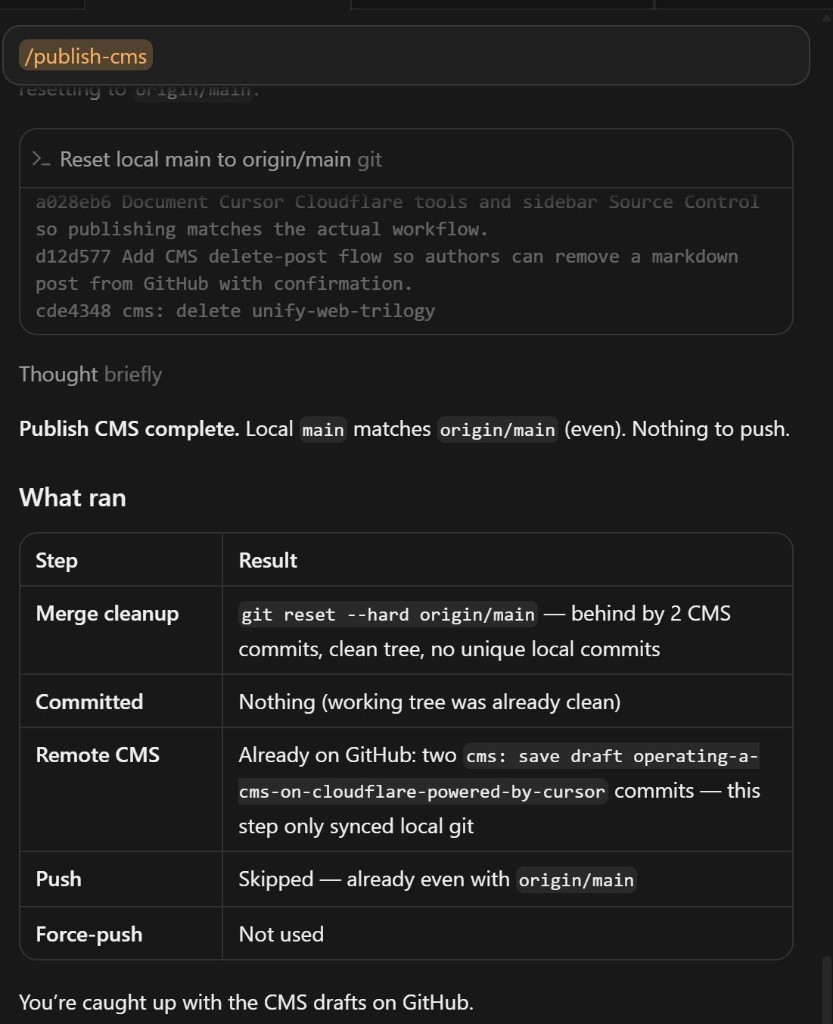
When I had local article and code edits while /admin had also saved the same post, rebase stopped on that Markdown file once. The old skill left Source Control mid-merge and waited for me. The updated skill keeps the local replayed commit, runs GIT_EDITOR=true git rebase --continue, pushes, and reports which files conflicted. Cloudflare’s Action builds. A minute or two later the deploy matches the files on main.
The other skill: /create_article
Fleshing out this post took a long prompt: look at git history, match the last article, quote /publish-cms, copy a screenshot, compose a hero, keep draft: true, never use em dashes. That is a loop I will run again. I do not want to retype it.
So there is a second skill in the repo, .cursor/skills/create-article/SKILL.md. Slash command /create_article (or /create-article). It is the Cursor half of the CMS. /admin Save draft still creates the stub on GitHub if I start there. /create_article asks a few questions, then writes or fills src/content/posts/{slug}.md.
What it asks, if the chat has not already answered:
- Working title and a one-sentence description
- Category:
how-to,from-revit-learning-club, orstorytelling - What happened, or what to teach
- New slug, or an existing stub from Save draft
- Sources: git history, sibling posts, a skill to quote
- Screenshots, and whether to compose a 16:9 hero for the home card
Then it reads src/content.config.ts and a sibling post for voice. If the topic is this repo, it reads git log and quotes real files. User screenshots go in public/images/posts/. The hero is HTML and a Chrome capture so the lettering stays exact, not a generative image. The markdown file stays draft: true. It does not publish, commit, or run /publish-cms unless I say so in that turn.
This page was the manual version. The next one can start with /create_article.
Here is that skill:
---
name: create-article
description: >-
  Interviews the user, then writes a RevThat Markdown draft in
  src/content/posts with matching voice, optional git-history research,
  in-article screenshots, and a composed 16:9 hero. Use when the user
  runs /create_article or /create-article, or asks to draft, flesh out,
  or compose a new blog post in Cursor the same way as the CMS article
  loop (stub or empty file, then agent writes the body).
---

# Create article (RevThat draft)

Write a **local Markdown draft** for this Astro blog. Do not publish. Do not run `/publish-cms` unless the user asks in this turn.

Admin Save draft and GitHub `cms: save draft …` are a different door. This skill is the Cursor Agent half: questions, then a file in `src/content/posts/`.

## Never

- Em dashes (`—`). Use commas, periods, or parentheses.
- Set `draft: false` or Publish from `/admin`
- Commit, push, or force-push unless the user asked in this turn
- Invent git history, quotes, screenshots, or URLs
- Mermaid (this site does not render it)
- Agent-prompt appendix unless the user asked for one
- Overwrite a **published** post (`draft: false` or omitted) without an explicit confirm
- Commit `.env`, `.dev.vars`, secrets, `dist/`, `.wrangler/`

## 1. Ask, then stop

Ask only what the chat has not already answered. Prefer 1–2 questions at a time. Do not write the post until you have enough to slug the file and not invent the story.

Need:

1. **Working title** and a one-sentence **description** (SEO/meta).
2. **Category** (exactly one or more of): `how-to`, `from-revit-learning-club`, `storytelling`.
3. **What happened / what to teach.** Enough substance to write in first person without padding.
4. **File:** new slug, or an existing stub (empty body, `draft: true`) to flesh out. If they already Save-drafted in `/admin`, use that `src/content/posts/{slug}.md`.
5. **Sources:** git history of this repo, sibling posts to link, a skill file to quote, other paths.
6. **Images:** screenshots they will paste/attach; whether to **compose a hero** (default yes when the post is a how-to or needs a home-card image).

If they attached images or named files, treat those as answers. If a stub already has title, description, category, and `pubDate`, keep them unless they ask to change.

## 2. Research

Before drafting:

- Read `src/content.config.ts` (schema is the contract).
- Read one recent sibling for voice, especially `src/content/posts/from-wordpress-to-a-free-cloudflare-site-with-httrack-and-cursor.md` and any post they named.
- If the topic is this site or a skill: `git log --oneline -40`, and read the real files you will quote. Summarize history in prose, not a dump of hashes.
- Confirm the slug is free, or that the stub is the intended file.

## 3. Voice

Match the journal, not a changelog:

- First person, short paragraphs, numbered steps where there is a sequence
- Honest tradeoffs
- Code fences for **real** config and commands from this repo
- Internal links: `/their-slug/`
- Images: `/images/posts/…` with a useful alt
- Quote a skill in a **four-backtick** outer fence if that file contains ` ``` ` fences

## 4. Images

User screenshots: copy into `public/images/posts/` as `YYYY-MM-DD-short-name.png` (or jpeg/webp/gif). Embed in the section they belong to (same pattern as the Source Control figure and the `/publish-cms` run figure).

**Hero** (home WorkCard + `og:image`): do **not** reuse a full chat screenshot as the card unless they insist. Compose a separate 16:9 image:

1. Write a small HTML/CSS frame (1280×720), Inter or system UI sans.
2. Put the one exact phrase they care about on the canvas (command pill, status line). Lettering must be exact, so **build with HTML**, not a generative image model.
3. Capture with Chrome/Chromium headless, device scale 2. Center the focal point so a square crop on the home cards still reads.
4. Save as `public/images/posts/YYYY-MM-DD-{slug}-hero.png`.
5. Delete the temporary HTML. Do not leave staging clutter.

Visual defaults when the post is about Cursor/CMS: dark editor background, orange rounded pill, no Cursor logo or extra slogans.

Frontmatter: `hero: /images/posts/YYYY-MM-DD-{slug}-hero.png`

Skip a composed hero only if they said no, or they already set `hero` on the stub and want to keep it.

## 5. Write the file

Path: `src/content/posts/{slug}.md`

Slug: lowercase `a-z0-9` and hyphens, from the title, max 80 chars. Filename is the public URL (`{slug}.md` → `/{slug}/`).

```yaml
---
title: "Exact title"
description: "One or two sentences."
pubDate: YYYY-MM-DD
hero: /images/posts/YYYY-MM-DD-slug-hero.png
categories:
  - how-to
draft: true
---
```

* `pubDate`: today unless the stub or the user set a date.
* `categories`: only schema values.
* `draft: true` always for this skill.
* Optional `updatedDate` only if they asked.

Body: the article. Keep `draft: true` through later edits in this chat unless they explicitly publish.

## 6\. Check

* Grep the **new prose** (not quoted skill source) for `—`.
* `npm run build` if the schema might be wrong. Drafts are omitted from public routes; that is intended.
* Do not flip `draft` to preview. Tell them the file path instead.

## 7\. Report

* Path of the markdown file
* That it is still `draft: true` (not on the live journal)
* Image paths written
* What to do next: iterate in chat, then Publish in `/admin` **or** `/publish-cms` when they want GitHub/local linear history

## Example

User: `/create_article` then “CMS on Cloudflare, how-to, quote publish-cms, here is a screenshot of the skill run.”

Agent: confirm title/description if missing → read git history and `.cursor/skills/publish-cms/SKILL.md` → copy screenshot → compose hero → write `src/content/posts/operating-a-cms-on-cloudflare-powered-by-cursor.md` with `draft: true`.
Two skills, one folder of Markdown. /create_article writes the draft in the repo. /publish-cms puts local commits on top of whatever /admin already wrote to GitHub.
Two doors, one folder of Markdown
I gave /admin back to the blog without giving WordPress back. The posts are still files. The host is still Cloudflare. The deploy is still “something landed on main.”
Use the admin when you want a WordPress-shaped box: new draft, paste a screenshot, unpublish, delete. Use /create_article when you want an agent to interview you, match the last post, and write the Markdown. Use /publish-cms when those two writers have to share main without merge bubbles.
The HTTrack and Cursor post is the previous chapter: how the static site got here. This chapter is how I operate it as a CMS whose database is a folder of Markdown, and whose second editor is the agent that is writing these sentences.